PFMEA and Control Plan — Checked Against Each Other
Track all 18 PPAP elements by submission level, build the PFMEA with AIAG-VDA action priority worked out, and turn it into the control plan in one click.
- ✓ AIAG-VDA action priority — High, Medium or Low, not RPN math
- ✓ Control plan rows made from the PFMEA in one click
- ✓ Every uncovered special characteristic flagged before it's sent
- 18 / 18 elements tracked for this part
- 3 High-priority PFMEA lines this submission
- 0 special characteristics left uncovered
PPAP, PFMEA and the control plan, finally in one place
18 PPAP elements
By submission level, 1 to 5 — level 3 sends everything except master sample and checking aids.
AIAG-VDA action priority
High, Medium or Low from severity, occurrence and detection — RPN still shown alongside.
Control plan in one click
Rows made straight from the PFMEA, flagging any line left uncovered.
Owners & due dates
On every element and action, so nothing sits unassigned.
Import your PFMEA
Upload the spreadsheet; merged cells for process step and failure mode fill down for you.
Send the package
PPAP status, PFMEA and control plan as one PDF, or an Excel workbook for the customer's forms.
Every part, its submission level and what's still open

The overview, with sample records: parts, submission levels, and open PFMEA actions.
From the part list to the package you send
Add your parts
Each part at its submission level. Import the PFMEA spreadsheet you already have, or start from a sample.
Work through it together
Owners and due dates on every element and action; the action priority and control plan gaps are worked out for you.
Send the package
Print the PFMEA, control plan and PPAP status for the customer, or download them to Excel.
Where the package actually comes together
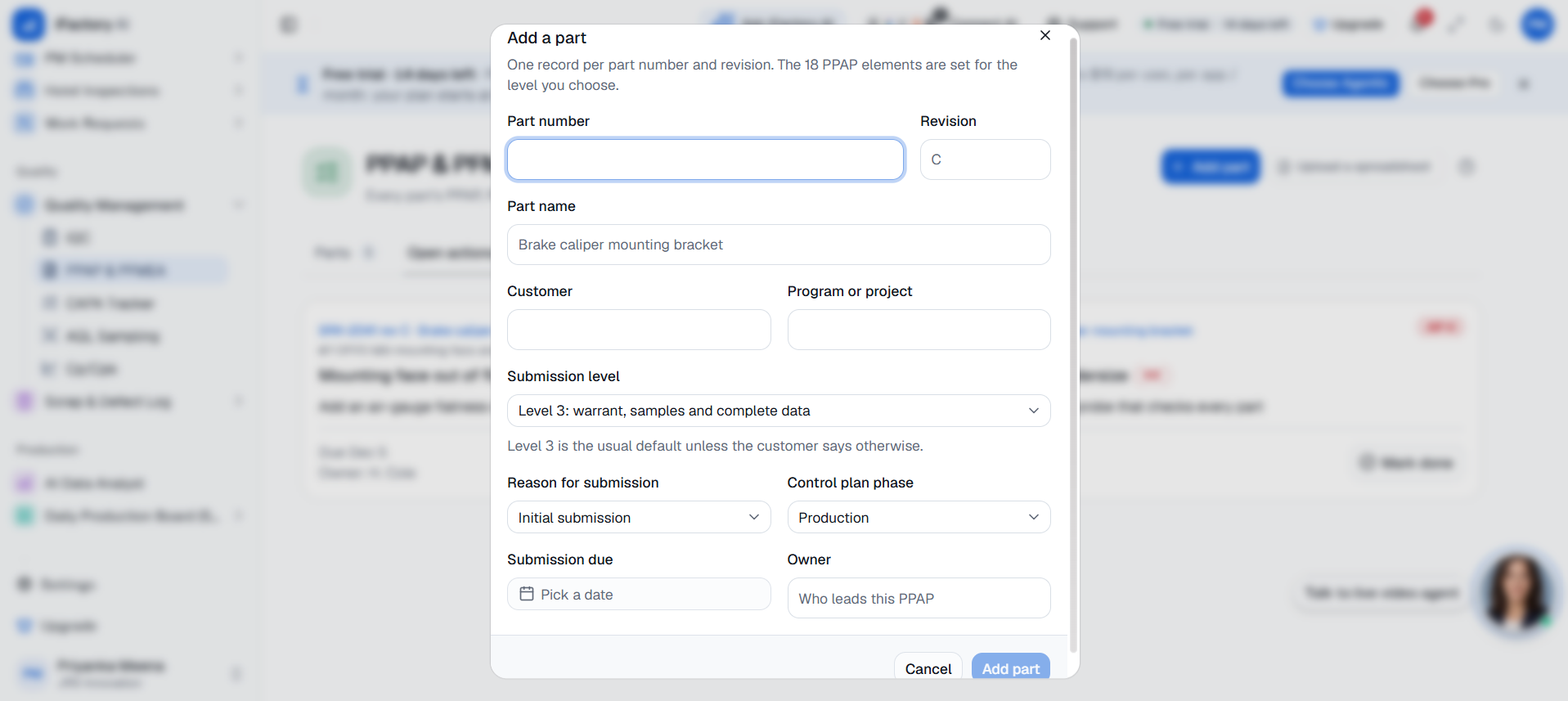
Add your parts
Each part at its submission level, 1 to 5 — the level decides which of the 18 elements are sent to the customer and which stay on file.
- ✓ Level 3, the usual default, skips master sample and checking aids
- ✓ Import an existing PFMEA spreadsheet straight onto the part
- ✓ Or start from a sample part to see the workflow first
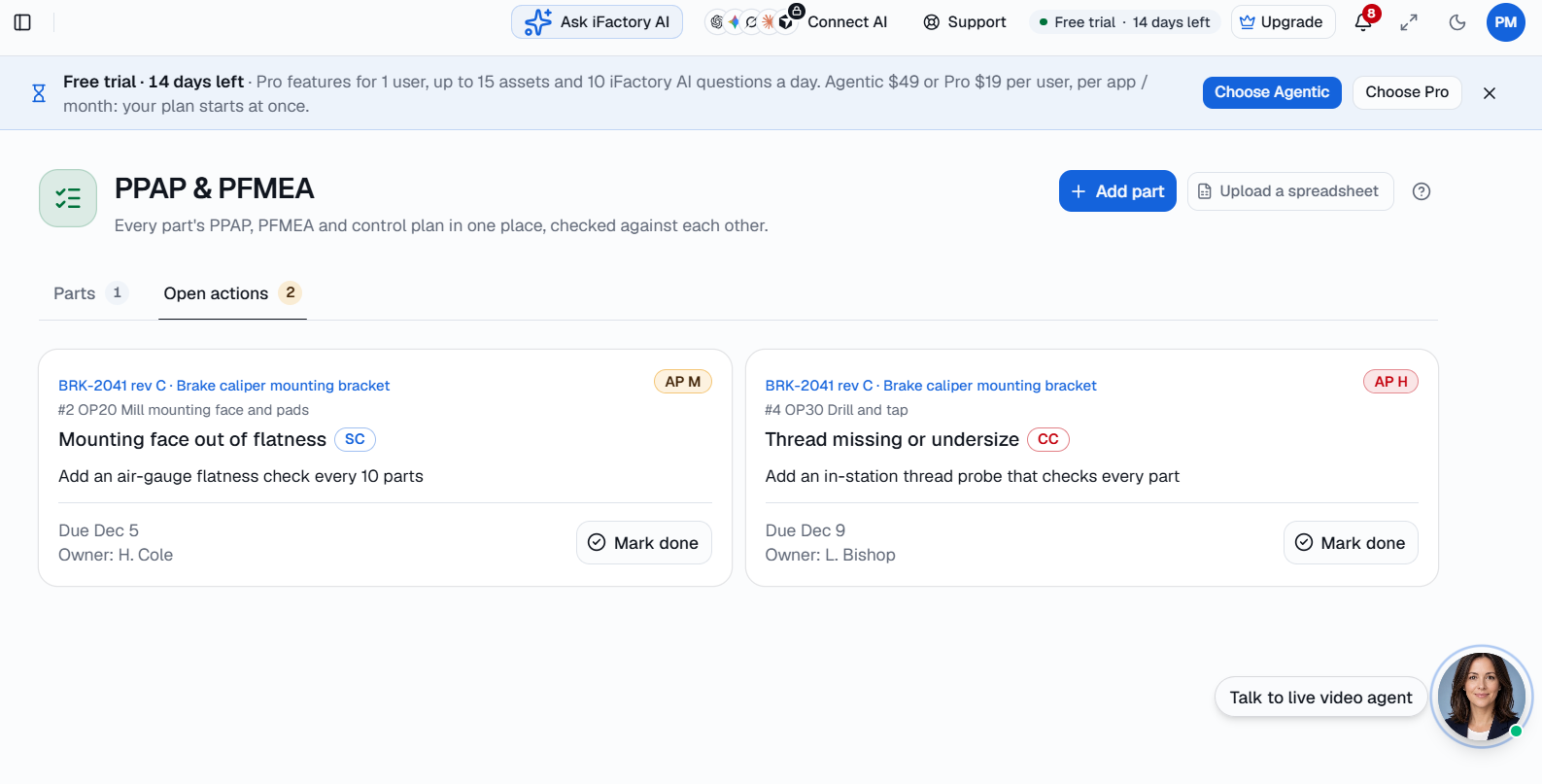
Action priority & open actions
Each line ranked High, Medium or Low from its severity, occurrence and detection ratings — not multiplied into an RPN, though the RPN still shows alongside.
- ✓ A High line needs an action, or a recorded reason controls are enough
- ✓ Owners and due dates on every open action
- ✓ Nothing closes without something behind it

Parts & control plan status
Every part, its submission level and whether its control plan actually covers what the PFMEA found.
- ✓ Control plan rows made from the PFMEA in one click
- ✓ Any special characteristic or High line with no control, flagged
- ✓ The mismatch that gets packages rejected, caught before it's sent
No separate add-ons to buy
Your whole team
Invite colleagues; owners and admins manage access.
iFactory AI
Ask questions and get answers from your own records.
Your data stays yours
Export everything to Excel or PDF, any time.
Hosted in the United States
Each company's records are kept separate.
Built for suppliers who live inside a PPAP cycle
Automotive suppliers
AIAG PPAP and AIAG-VDA FMEA, the forms most OEM customers expect.
Tier 1 & Tier 2 plants
Multiple parts, each at its own submission level, tracked in one place.
Supplier quality teams
Owners and due dates across every open action, not scattered spreadsheets.
APQP & launch engineers
PFMEA and control plan kept in step from the first submission onward.
What's different once it's running
A mismatch between the PFMEA and the control plan is caught here, not by the customer.
The PFMEA, control plan and PPAP status stop living in three different spreadsheets.
Every High-priority line has an action or a recorded reason — never just left open.
Special characteristics without a control are flagged before the customer sees them.
Before you start the trial
If something's missing here, a quick call usually answers it faster than a help page.
Can I import our existing PFMEA?
Does it still show the RPN?
What can we send the customer?
Can I bring my existing PFMEA?
Who can see our records?
What happens after the trial?
Try PPAP & PFMEA free for 14 days
No card needed. Bring your PFMEA spreadsheet and be running in minutes.
Start free trial →